Engineered from 25+ Years of IT Expertise

Precision, safety‑first cleanup—built from real IT experience.

Most computers don’t slow down overnight — performance declines gradually as hidden files, browser residue, and system clutter accumulate. Complete PC Health Fix packages a precision, safety‑first workflow into one guided run.

Precision over gimmicks
Focused on safe, practical improvements instead of flashy promises.
Pay once (no subscriptions)
Runs on your machine—no ongoing fees.
Private by default
No telemetry and no data harvesting.
Guided workflow
Clear status + steps across Windows, browsers, and exposure checks.
See what it does ✔ No data harvesting  •  ✔ Safety‑first approach
Windows PC Clean Normal Browser Clean System Exposure Scan

What it does

Three cleaning tracks, designed to be safe, practical, and easy to run.

W

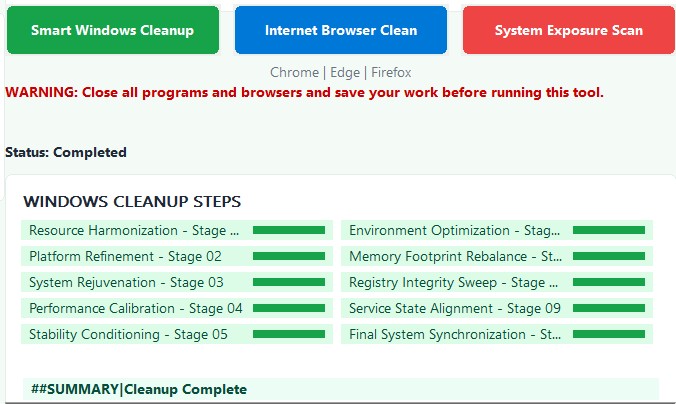
Windows PC Clean

Removes unnecessary files and operating system residue that quietly degrade responsiveness over time.
Resource Harmonization — Stage 01
Platform Refinement — Stage 02
System Rejuvenation — Stage 03
Performance Calibration — Stage 04
Stability Conditioning — Stage 05
B

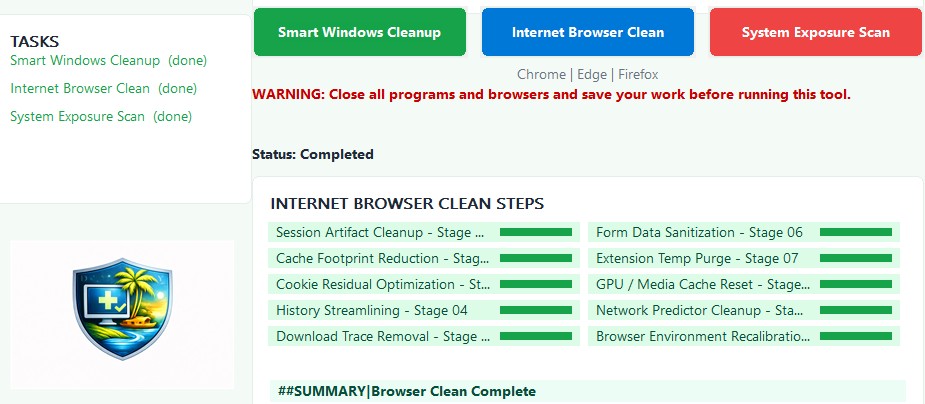
Normal Browser Clean

Clears cached buildup and browsing residue to improve responsiveness and support better privacy hygiene.
Cleans: Chrome • Edge • Firefox
Session Artifact Cleanup — Stage 01
Cache Footprint Reduction — Stage 02
Cookie Residual Optimization — Stage 03
History Streamlining — Stage 04
Download Trace Removal — Stage 05
S

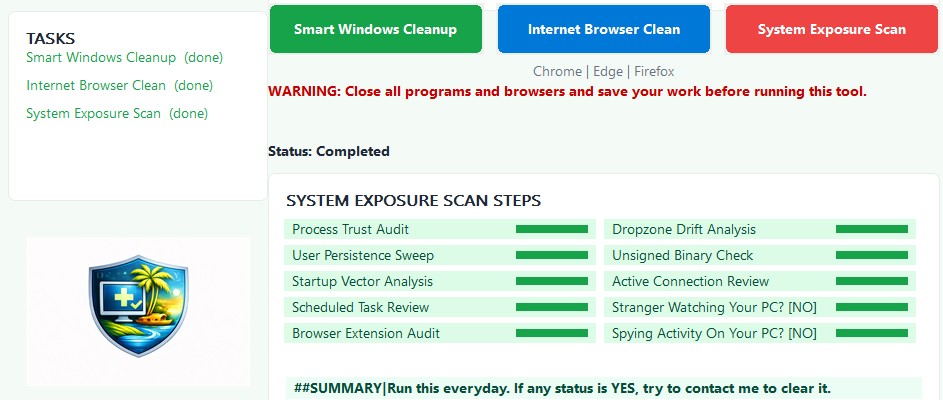
System Exposure Scan

Highlights common exposure patterns so you can review risk indicators and keep systems cleaner over time.
Process Trust Audit
User Persistence Sweep
Startup Vector Analysis
Active Connection Review
Unsigned Binary Check

Inside the app

These screens show the guided workflow and the status you’ll see during each run.

Smart Windows Cleanup screen
Smart Windows Cleanup
Internet Browser Clean screen
Internet Browser Clean
System Exposure Scan screen
System Exposure Scan

Why home users choose it

Built for real-world PCs. Careful by design.

Engineer‑built

Created from decades of professional IT experience supporting both home users and enterprise environments.

Safety‑first

Designed to be practical and careful — not a risky “one‑click miracle.”

Private by default

Runs locally with no telemetry and no data harvesting.

Customer feedback

Submitted reviews are held for approval before they appear publicly.

Write a review
Want a full list? View all reviews.

FAQ

Quick answers to the common questions.

Is this for home users?

Yes — it’s designed for everyday home PCs that have become slower over time due to accumulated clutter and browsing residue.

Does it collect or upload my data?

No. The tool is designed to run locally. No telemetry and no data harvesting.

How do I get the download after purchase?

After Stripe checkout, you’ll return to this page and the Download button will unlock automatically.

What if I need help?

Use the Customer Support Portal to open a request any time.

Privacy & safety

No data harvesting • Safety‑first approach • Practical, careful cleanup.

Runs locally

Designed to operate on your machine—not in the cloud.

No telemetry

No hidden tracking, no analytics, no “phone home” behavior.

Careful workflow

Guided steps with clear status—built to avoid risky shortcuts.

Customer Support Portal

Open support before you buy, or any time after purchase.

Support email: support@ajcloudworks.com

Open a request

Use the link below (you can replace it later with your portal URL).

Email Support
Before purchase

Questions about compatibility or payment?

Write a review
After purchase

Need the download link re-sent?

Request link

Note: This page is a static front-end template. If you want “ticketing + folders” (GoodReview / RejectReview) automated, connect the review form to Power Automate or a serverless endpoint and route messages to Outlook folders.